Key Concepts
The building blocks of Aliada — Sessions, Versions, Projects, and Teams — and how they fit together.
Aliada is built around four simple ideas. Everything else flows from these.
Session
A Session is the song, beat, or audio file you’re working on — everything you create, version, and share lives inside one. Each session holds all the versions of that file, comments, attachments, and collaborator activity in one place.
Think of a session as the permanent home for one piece of work, no matter how many times it gets revised.
Version
Every time you upload a new mix or revision, it becomes a new Version of the session. You can compare versions side by side, loop a section across both, and leave comments pinned to specific moments. Old versions are never deleted.
Project
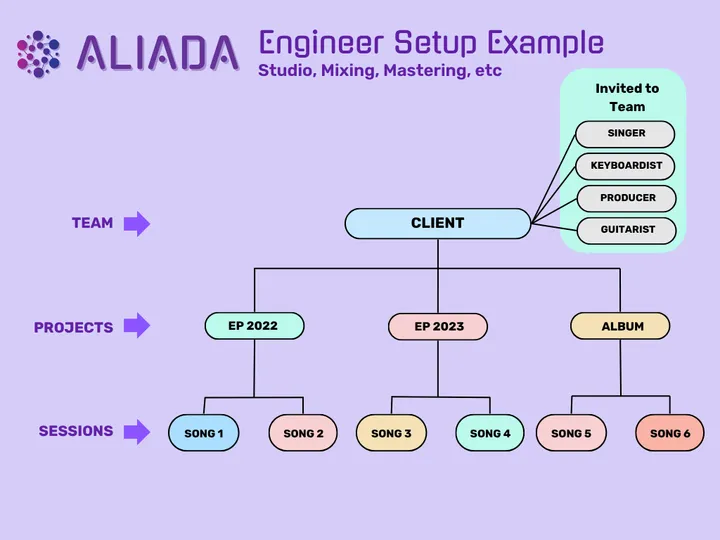
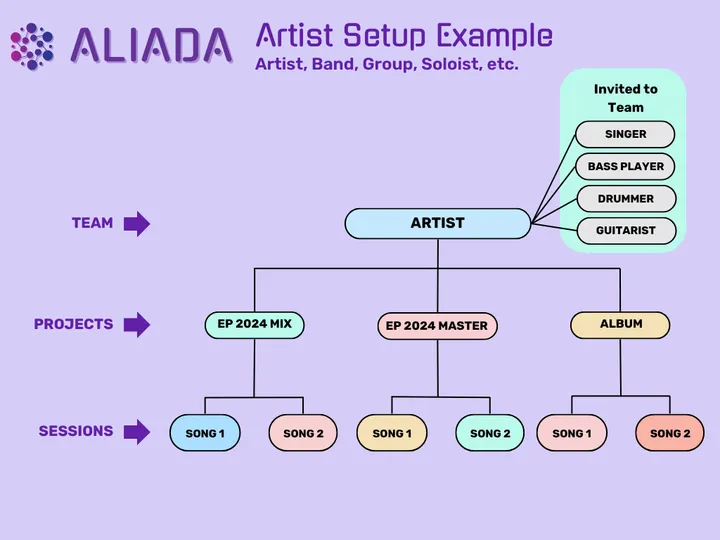
A Project groups related sessions together — an album, an EP, a film score, a single. Projects live inside a Team.
Examples: Fall 2025 Album, Client: Nike Campaign, Demo Sessions.
Team
A Team is the people you make music with. You can have multiple teams (one per band, one per client, etc.). Each team has its own projects, sessions, and contacts.
Artist workspace example
Engineer workspace example